Hannah Moran × Christian Ryan · 09:44 "Claude really loves structure, really loves organization."
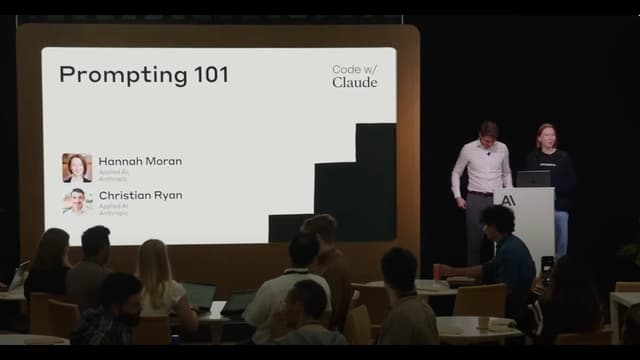
A Swedish auto insurance company puts the daily pile of accident claims into Claude's hands. The inputs are two — a Swedish-language traffic accident report form with 17 checkboxes, and a hand-drawn accident sketch. The required output is an assessment of the accident and a fault determination. Hannah Moran and Christian Ryan of the Anthropic Applied AI team use this real customer use case as the material for a live workshop in which they grow a single prompt step by step, from V1 through V5.
V1 is a simple request plus two images. Claude misreads it as a "ski accident" and generates a non-existent street name for the location. "In our prompt we hadn't actually done anything to set the stage" (03:03), Christian admits. V2 adds context, V3 explains the form structure up front, V4 specifies the order of reasoning, and V5 pins down the output format with XML tags. Each version is run as a demo, and what improves with each addition is shown live in the console. That is the structure.
The single idea running through the talk: " Prompt engineering The craft of designing input (= prompts) for language models. You explicitly write out context, role, instructions, examples, output format, and so on to get the model to complete a task. Anthropic frames it as an 'iterative empirical science.' is a highly iterative empirical science" (03:22). Don't try to write the perfect prompt in one shot — narrow down how you hand information to the model while running test cases. And the design of "what to make Claude think, and how" matters more than the request of "what to ask Claude for." In 24 minutes, Anthropic's official foundational teaching material systematically conveys a 10-element prompt structure, sitting as the entry point for the Code w/ Claude series.
The speakers are Hannah Moran — Anthropic Applied AI, joined March 2025. Previously Technical Lead at PwC's Innovation Hub / AI & Emerging Technology, in charge of educational content drawing on her enterprise AI integration project experience. Co-speaker Christian Ryan — Anthropic Applied AI Engineering Manager (London), formerly Machine Learning Engineer and Data Scientist at Voi Technology. He supports customer production integrations from the engineering side.
Key Observations
Why V1 read it as a "ski accident" — without a stage, the model builds one itself (02:50)
The V1 prompt is effectively just "analyze this, decide fault." Hand Claude a 17-checkbox form and a hand-drawn sketch with no further setup, and Claude reads it as a "ski accident," generating "Schöpfanggatan" — a non-existent street name — for the location. The failure shows that an LLM will pull the most natural interpretation out of the material, but that natural interpretation is not necessarily the one the reader assumes.
Christian's reflection: "Claude did make some inexplicable mistakes, but we hadn't done anything to set the stage — so a failure of this level is understandable" (03:03). This is the framing pivot. Move from writing prompts "on the assumption the model will fill in the context inside my head" to assembling them "on the assumption Claude only has the context you explicitly write." The remaining 24 minutes are devoted to the parts needed to make that shift.
A practical implication: the Applied AI team recommends collecting "failed cases" as evaluation data. "V1 read it as a ski accident" is not just an error — it goes into the test set. Every time you update the prompt at V2 and beyond, you run the same input and measure whether "it now recognizes it as a car accident." "You can confirm that you're actually working on the problem you're trying to solve" (03:36).
Task context and tone context — hand over role and behavior in two passes (03:44 – 06:00)
The first thing added in V2 is two context elements. Task context = "you are an AI system supporting a human claims adjuster. You're reviewing a Swedish-language car accident report. You also have a hand-drawn accident sketch." That alone narrows Claude's interpretive space down to "analyzing accident reports in an insurance setting."
Tone context is a separate axis. "State facts, be confident, don't speculate, and if you're not confident, don't make the call" — explicitly state the behaviors you don't want. This is the mechanical implementation of the design principle "make the model say 'I don't know' rather than hallucinate." V2's live result reads as a "car accident," parses "vehicle A is checkbox 1, vehicle B is 12," and Claude itself declares "not enough information to determine fault." A moment close to being able to self-report uncertainty.
Hannah's emphasis is that role definition alone isn't enough. "What's important here is that we want Claude to state facts, to remain confident" (06:04). Splitting role (= who you are) and behavior (= how you should behave) into two pieces becomes the baseline for every later version improvement.
Static data in the system prompt, dynamic data in the user prompt (06:30 – 09:30)
V3 adds the "form structure explanation up front." The meaning of each of the 17 rows, the column structure (vehicle A / vehicle B), where the title lives, and even a caveat — "a human fills in this form by hand, it won't be perfect, you'll see circles, scribbles, X marks, all sorts" — go into the system prompt The top-level instruction that governs an LLM's behavior. Passed via the system field of the API request and treated as a layer separate from user messages. The standard practice is to place role definitions, tone, and static background information here. as a how-to-read-the-form guide.
One important decision here. This long explanation goes in the system prompt, not in the user prompt The actual input from the user to the model. Appended after the system prompt, this is the layer for dynamic data that changes per request. Usually shorter than the system prompt, containing session- or query-specific information. . Two reasons. First, the form structure is static data that doesn't change per request. Take advantage of the property "the form is the same, only the contents differ" to make prompt caching A mechanism that reuses the leading portion of a prompt across multiple requests. In the Anthropic API, specifying the cache_control parameter dramatically reduces latency and cost on cache hits. Has a TTL of about one hour. work. Second, for Claude, "reading the form from scratch every time" and "reading the contents within a pre-understood format" carry very different cognitive loads — the latter improves read accuracy.
"Next time, Claude can shorten the time spent reading this form, and in the meantime the accumulated understanding also improves the reading" (09:27). A rare example where efficiency (lower latency, lower cost) and accuracy (fewer reading errors) both improve through the same design decision. When you assemble a production pipeline against the API, "what is static and what is dynamic" being the first question of prompt design gets named here.
Drawing boundaries with XML tags — why XML over Markdown (10:08 – 11:25)
Claude's training data contains many examples of XML tags Structured markup in the <tag>content</tag> form. Anthropic's training data contains many examples of inputs and outputs in XML form, so Claude strongly recognizes XML boundaries. Anthropic's recommended style is to wrap each section in tags like <task>, <context>, <examples>. being interpreted (Anthropic has, in training, emphasized XML-formatted inputs and outputs). As a result, explicit tags like <form>...</form> or <user_preference>...</user_preference> convey to the model that "this is a specific block of information, bounded here." Markdown A lightweight markup language. # for headings, * for emphasis, - for lists, etc. Claude can interpret Markdown too, but it's weaker than XML tags at making structural boundaries explicit (the physical boundary between heading and body is implicit). works too, but tags make boundaries explicit and stable.
Hannah's explanation: "We're about to read in content related to user preferences, and these XML tags let Claude know everything wrapped by the tags is a user preference. And later in the prompt, when Claude needs to refer back to that information, it helps" (10:20). Tags function as a device for handing over information "with a label attached."
The implementation implication: getting into the habit of wrapping each section in XML tags means the boundaries stay stable even when you rewrite the prompt later. For example, the task description inside <task>, background information inside <context>, examples inside <examples>. LangChain and LlamaIndex Prompt Templates do the same thing under the hood, but if you're writing prompts yourself, explicitly using tags gives you more control. Related to this, the Anthropic-official anthropics/prompt-eng-interactive-tutorial on GitHub is written in this same pattern.
Specifying the order of reasoning — where the largest improvement occurred (17:00 – 19:30)
V4 adds detailed step instructions. "First look at the form, carefully check what's marked in each box, build that list, then look at the sketch, and with the understanding of the accident you have so far, cross-reference what you learned from the form against the sketch." The order is made explicit.
Why does specifying this order produce a large improvement? Hannah's account: "If you were a human, you probably wouldn't first look at the drawing and try to understand what's happening" (17:34). The sketch is a collection of lines and boxes — on its own, ambiguous. Read the form first to get the skeleton — "this is a traffic accident, specific vehicles, specific check items" — and then look at the sketch, and the shapes carry meaning. The same goes for the LLM.
The live result: V4 turns form reading into a per-box inspection step, with an output that confirms each one — "is box 1 checked? not checked? what?" — one at a time. Fault-determination confidence rises, and a clear verdict — "fault is with vehicle B" — emerges. Hannah's assessment: "This kind of step-by-step thinking from Claude is enormously influential in its ability to make the right assessment here" (19:32). An application of Chain of Thought (CoT) Chain-of-thought prompting. A technique that makes an LLM output the intermediate reasoning steps, not just the final answer. Since the 2022 paper showing that inducer phrases like 'Let's think step by step' improve performance, it has been one of the standard LLM techniques. prompting, but the difference is that instead of asking vaguely "to think," you specify the order of reasoning: "think about this first, then this, finally this."
Output format = "return only the final verdict inside an XML tag" (19:30 – 21:30)
V5 specifies the output format. "Wrap the final verdict in <final_verdict>...</final_verdict>." The reasoning explanation can still come out, but what the application actually needs is just the verdict. Extracting the tag contents with a regex or XML parser stabilizes downstream — storing to a SQL database, passing to subsequent pipelines.
Christian's framing: "The flashy preamble is wonderful, but at the end of the day, what you need is the information. The information you need to save to where you want it in the SQL database. The rest of what Claude thought to arrive at the verdict — the application doesn't actually need it" (20:30). A design decision: explicitly label and return the information the core of the application needs.
As a side effect, Claude itself constructs the reasoning with "I'm going to answer with the final verdict" in mind. Specifying the output format works as a "goal declaration" to the model. This sits in the Anthropic Constitutional AI lineage — the design philosophy of "writing directly to the model what you want it to do" is reflected even in the format specification of the prompt.
Pre-filled responses — putting words in Claude's mouth (22:10 – 23:00)
Use the Pre-fill (pre-filled response) A technique that pre-writes the opening of the model's response into the assistant message slot of the API request. Claude continues from there, so you can suppress preambles or physically enforce specific formats like JSON / XML. In the Anthropic API, pre-fill is enabled by sending the last message of the Messages API in the assistant role. feature, and you can pre-specify the first few tokens of Claude's response. Write "<final_verdict>" into the assistant message slot of the request, and Claude continues from there. The preamble ("Sure, let's start the analysis…") is dropped, and the output starts directly from the tag contents.
Christian's metaphor: "You're literally putting words in Claude's mouth — a pre-filled response" (22:17). A metaphor that makes the abstract API operation intuitive, and one of the small great phrases of the talk. Syntactically it's just appending a prefix to the assistant message, but the effect is clear.
As a practical example, when JSON is required, putting into the pre-fill physically forces Claude to continue in JSON. The same for structured XML output. Rather than writing in the prompt body "answer in JSON," controlling the physical starting point of the output is more reliable, and downstream parser error handling becomes simpler. The three-piece set of prompt caching + structured output + pre-fill becomes the basic template for API pipelines.
Extended thinking = the "crutch" of prompt engineering (23:30 – 24:00)
On Claude 3.7 / 4-series hybrid reasoning models An architecture in which the same model can switch between 'normal response mode' and 'extended thinking mode.' Introduced with Claude 3.7 Sonnet (released February 2025). Enabled at API request time via the thinking parameter, which allocates token budget and thinking time. , you can enable extended thinking A feature in which the model decomposes and reasons about the problem in an internal scratchpad (inside the <thinking> tag) before responding. Anthropic calls it 'extended thinking.' Tokens spent during extended thinking are also billed, but accuracy on complex judgments rises, and you can debug the reasoning process. (a scratchpad inside the <thinking> tag). Christian's choice of phrase is interesting: "You can use this as a crutch for prompt engineering" (23:33). Not "stepping stone," not "training wheels" — "crutch": support used at a stage where you should be able to walk but cannot yet.
Two ways to use it. First, simply give Claude the time and tokens to think. Turn on extended thinking, and before the final response Claude decomposes the problem, forms hypotheses, and tests them inside <thinking>. As a result, accuracy on complex judgments improves. Second, use it as a "readable debug log of the reasoning process." Observe inside <thinking> where Claude gets stuck or which hypothesis it drifted to, and get hints for prompt improvement from that.
The choice of "crutch" carries an implication. You could read it as "write a perfect prompt and extended thinking becomes unnecessary." Christian's intent is probably: "Don't rely on it as a substitute for prompt design — use it as a stepping stone for observing the reasoning process and improving your prompt design proper." This is a posture characteristic of the Anthropic Applied AI team — they recommend an operational loop of "observe with extended thinking and fix the prompt" rather than "muscle through with extended thinking."
Industry Context
The Anthropic Applied AI team is a separate organizational axis from the Personality Alignment team (led by Amanda Askell). Where Personality Alignment handles "Claude's personality, values, and constitution training," Applied AI is in charge of supporting and educating "how customer companies integrate Claude into products." As Hannah Moran's (ex-PwC) and Christian Ryan's (ex-Voi Technology) backgrounds suggest, members come from enterprise IT / B2B product development. It's not a pure research organization but one that accumulates know-how on the deployment side.
Code w/ Claude was Anthropic's first developer-focused event, held in San Francisco in May 2025. Alongside the main keynote with Boris Cherny (Claude Code lead) and Ami Vora (CPO), practical workshops like this one ran in parallel. A year later, in May 2026, Code w/ Claude SF Extended was held, continuing into sessions like Dickson Tsai (Claude Code engineer) explaining new features such as Remote Control / Voice mode / Auto memory / Routines. The culture of "providing Anthropic-official systematic teaching material on prompting and coding" took root in this series.
Across the industry, 2025 was a period when the line "prompt engineering will become unnecessary" was spreading. The claim: as models get smarter, users' natural language alone will be enough. This talk takes the opposite stance — the smarter the model gets, the more pulling out advanced capabilities requires input design; the share of output quality determined by input design does not change, and in fact responsibility grows. Starting from the premise "Claude has only the context you explicitly write" is a quiet rebuttal to the industry's optimism.
Comparison with related Anthropic-official materials
Anthropic offers the same theme in multiple formats. This talk, "Prompting 101," is the foundation for single-task work; the follow-up "Prompting for Agents" (a separate Code w/ Claude SF 2025 episode) covers the multi-turn, tool-using agent case; the GitHub repo anthropics/prompt-eng-interactive-tutorial is an interactive learn-by-running tutorial; and the Anthropic Console's Prompt Generator is a feature that, given a task, has Claude write the prompt in Anthropic's recommended format. That is how they divide the territory.
The difference from the OpenAI-style prompt engineering guides is also clear. OpenAI leans toward "a checklist for the best prompt," organizing principles as bullets — "be clear," "give examples," "make it think step by step." Anthropic leans toward "treat the prompt as part of the training data," going deeper into structural operations like XML tags, the division of system / user / assistant roles, and pre-fill. The latter comes out of the Constitutional AI A training method developed by Anthropic. The model is given a 'constitution' (= a document of ethical principles), and the model itself self-evaluates and self-corrects candidate outputs against the constitution to produce the reward signal. As opposed to RLHF, which involves human raters, this is called RL-AIF (Reinforcement Learning from AI Feedback) — AI evaluating AI. lineage, and the design decision to "write rules directly into the model" is reflected in the prompt notation itself.
Implementation Implications
For building chatbots or LLM pipelines against an API, the practical takeaways from this talk fall into three.
First, use the system prompt and user prompt intentionally and differently. Static data (form structure, domain rules, role definitions) goes in the system prompt. Dynamic data (user input, timestamps, session IDs) goes via the user prompt. Whether prompt caching works ties directly to per-request cost (in the Anthropic API, you specify the cache range explicitly with the cache_control parameter).
Second, combine "specifying the output format with XML tags" plus "pre-filling to force the opening." Free-form text looks nice but is painful to process downstream. Have Claude write explicit tags like <final_verdict>, and use the assistant message prefix to ensure it starts from there. Production-level reproducibility is secured.
Third, use extended thinking as a "debug log." In production you may turn extended thinking off to save cost, but at the prompt-improvement testing stage, reading inside <thinking> reveals where Claude is getting stuck. That becomes the starting point of the prompt-improvement loop. The operational pattern: observe with extended thinking on → fix the prompt → re-test → if the fix worked, the improvement remains even with extended thinking off.
Critical Perspective
The V1 → V5 progression shown in the talk is also somewhat idealized. In real products, transitions from V2 to V3 or V3 to V4 often pivot — "no effect," "actually worse." In the talk everything improves smoothly, but real prompt development involves more trial and error. The actual loop: run 5–10 test cases from your evaluation data, observe "the average improved but specific cases regressed" or "a few edge cases broke," and make the next decision from there.
The choice of subject also carries a bias. The Swedish auto insurance report is a typical example of a domain LLMs are relatively good at — "a document with clear structure plus an explicit set of rules." In domains like free-form legal consultation, medical diagnosis, or creative writing — domains where structure is ambiguous — the same V1 → V5 approach won't necessarily work the same way. For example, the effect of "specifying the order of reasoning" is larger for problems with a clear order; for problems where the order itself is part of the problem, a different approach is needed.
"Extended thinking is a crutch" also carries nuance. The speaker's intent is "a stepping stone for prompt design," but in real products it can easily turn into "rely on the crutch and skip the proper prompt design." Extended thinking's dynamic token consumption has a large cost impact, so additional guidance on "when to drop the crutch" would have been even more useful for production decisions. Still, as a session that systematically conveys a 10-element prompt structure in 24 minutes and shows the effect through live demos, this remains one of the most practical Anthropic-official teaching materials available today.
Reader Takeaways
- Open your existing prompts and check whether task context and tone context are written at the top. If not, adding a few lines changes response quality
- Distinguish static from dynamic data and move static data into the system prompt. In the Anthropic API, the
cache_controlparameter enables prompt caching - When structured output is required, specify the output format with explicit XML tags and force the opening with pre-fill. Downstream parsing stabilizes
- When Claude gets it wrong, first turn extended thinking on and read
<thinking>. You can see where the judgment went astray. Work backward from there and fix the prompt side - State "the order of reasoning" explicitly. Just writing "first look at this, then this, finally make the call" changes the quality of the final verdict
- Accumulate failed cases as test cases. Run them every time you improve the prompt and confirm that past failures do not recur
Video Outline
- (00:00) Self-introductions and the workshop's intent. Hannah Moran and Christian Ryan from the Anthropic Applied AI team present the direction: "prompt engineering best practices, learned from a real example." Introduces the Swedish auto insurance accident-claims subject
- (01:42) Detailed introduction of the subject. Inputs are (1) a Swedish traffic accident report form with 17 checkboxes, (2) a hand-drawn accident sketch. The supplement that Hannah cannot read Swedish but Christian can highlights the need for an LLM-based solution
- (02:30) V1 live demo. Simple prompt + 2 images submitted to the Anthropic Console. Claude 4 Sonnet model, temperature zero, max tokens set generously. Result: misread as a "ski accident," generating a non-existent street name
- (03:22) Reframing: "prompt engineering is a highly iterative empirical science." Don't try to write the perfect prompt in one shot — adopt the posture of running test cases and looping through improvement
- (03:44) Foreshadowing the 10-element framework. Task context, tone context, background data, detailed instructions, examples, conversation history, immediate task description, reasoning sequencing, output format, pre-filled response — the structure of explaining all 10 elements in order is laid out
- (04:32) Explanation of task context and tone context. Role definition like "you are an AI system supporting a human claims adjuster" + behavior definition like "state facts, be confident, don't speculate," in two stages. Re-submitted as V2, with the improvement from "ski accident" to "car accident" shown live
- (06:30) V3 adds a prior explanation of the background data (form structure). Each of the 17 rows' meaning is conveyed to Claude. The decision to place static data in the system prompt, the affinity with prompt caching, and the difference in cognitive load are explained
- (09:30) Information organization methods (XML tags vs Markdown). Because Claude's training data contains a lot of XML, drawing structural boundaries with XML tags works. Examples of wrapping user preferences and background documents in tags like
<user_preference>...</user_preference> - (12:42) Examples (few-shot prompting). Not included in the live demo, but in real products, showing difficult judgment criteria with examples is more effective than explaining them in words. The technique of building in base64-encoded image examples + explanations
- (15:00) Transition to conversation history and detailed task instructions. The distinction: in user-facing apps, leverage conversation history; in backend pipelines, embed detailed task instructions
- (17:00) V4 specifies the order of reasoning. Hand Claude the natural human analytical sequence: "first read the form → build a list of boxes → look at the sketch → final verdict." Observe careful per-box inspection
- (19:30) V5 specifies the output format. The instruction to "wrap the final verdict in
<final_verdict>tags" stabilizes downstream processing in the API - (22:00) Explanation of pre-filled responses. The metaphor "putting words in Claude's mouth" introduces the technique of pre-specifying the first tokens at the start of Claude's turn. A method for reliably producing structured JSON / XML output
- (23:00) Use of extended thinking. On Claude 3.7 / 4 hybrid reasoning models, observe the scratchpad inside
<thinking>tags and get hints for prompt improvement. The phrase "the crutch of prompt engineering" is used - (24:00) Closing. A pointer to the follow-up "Prompting for Agents" and a plug for Claude Plays Pokemon
Key Quotes
- "(Prompt engineering is) how to communicate with the language model and try to get it to do what you want" (00:26)
- "The best way to learn this is to practice it" (00:47)
- "In our prompt we hadn't actually done anything to set the stage" (Christian, reflecting on the V1 failure, 03:03)
- "Prompt engineering is a highly iterative empirical science" (03:22)
- "Tell Claude — what are you here to do? What's your role? What kind of task are you trying to complete today?" (Hannah, 04:25)
- "State facts, be confident, don't speculate, and if you're not confident, don't make the call" (V2 tone context, 04:34)
- "Claude really loves structure, really loves organization" (Hannah, 09:44)
- "These XML tags let Claude know everything within the tags is related to user preferences" (Hannah, 10:20)
- "A human is filling in this form. It won't be perfect — circles, scribbles, X marks, all sorts of patterns" (11:30)
- "If you were a human, you probably wouldn't first look at the drawing and try to understand what's happening" (17:34)
- "This kind of step-by-step thinking from Claude is enormously influential in its ability to make the right assessment here" (19:32)
- "The flashy preamble is wonderful, but at the end of the day, what you need is the information" (Christian, 20:30)
- "You're literally putting words in Claude's mouth — a pre-filled response" (Christian, 22:17)
- "You can use extended thinking as a crutch for prompt engineering" (Christian, 23:33)
- "This is not just token-efficient — it's also a good way to understand how these intelligent tokens work" (24:01)
Sources
Prompting 101 | Code w/ Claude — Hannah Moran × Christian Ryan, Anthropic Applied AI
Related Anthropic-official resources:
- Anthropic Interactive Prompt Engineering Tutorial (GitHub)
- Prompting for Agents | Code w/ Claude (follow-up)
Glossary
- Prompt engineering
- The craft of designing input (= prompts) for language models. You explicitly write out context, role, instructions, examples, output format, and so on to get the model to complete a task. Anthropic frames it as an "iterative empirical science."
- System prompt
- The top-level instruction that governs an LLM's behavior. Passed via the system field of the API request and treated as a layer separate from user messages. The standard practice is to place role definitions, tone, and static background information here.
- User prompt
- The actual input from the user to the model. Appended after the system prompt, this is the layer for dynamic data that changes per request. Usually shorter than the system prompt, containing session- or query-specific information.
- Prompt caching
- A mechanism that reuses the leading portion of a prompt across multiple requests. In the Anthropic API, specifying the
cache_controlparameter dramatically reduces latency and cost on cache hits. Has a TTL of about one hour. - XML tags
- Structured markup in the
<tag>content</tag>form. Anthropic's training data contains many examples of inputs and outputs in XML form, so Claude strongly recognizes XML boundaries. Anthropic's recommended style is to wrap each section in tags like<task>,<context>,<examples>. - Markdown
- A lightweight markup language.
#for headings,*for emphasis,-for lists, etc. Claude can interpret Markdown too, but it's weaker than XML tags at making structural boundaries explicit (the physical boundary between heading and body is implicit). - Chain of Thought (CoT)
- Chain-of-thought prompting. A technique that makes an LLM output the intermediate reasoning steps, not just the final answer. Since the 2022 paper showing that inducer phrases like "Let's think step by step" improve performance, it has been one of the standard LLM techniques.
- Pre-fill (pre-filled response)
- A technique that pre-writes the opening of the model's response into the assistant message slot of the API request. Claude continues from there, so you can suppress preambles or physically enforce specific formats like JSON / XML. In the Anthropic API, pre-fill is enabled by sending the last message of the Messages API in the assistant role.
- Hybrid reasoning model
- An architecture in which the same model can switch between "normal response mode" and "extended thinking mode." Introduced with Claude 3.7 Sonnet (released February 2025). Enabled at API request time via the
thinkingparameter, which allocates token budget and thinking time. - Extended thinking
- A feature in which the model decomposes and reasons about the problem in an internal scratchpad (inside the
<thinking>tag) before responding. Anthropic calls it "extended thinking." Tokens spent during extended thinking are also billed, but accuracy on complex judgments rises, and you can debug the reasoning process. - Constitutional AI
- A training method developed by Anthropic. The model is given a "constitution" (= a document of ethical principles), and the model itself self-evaluates and self-corrects candidate outputs against the constitution to produce the reward signal. As opposed to RLHF, which involves human raters, this is called RL-AIF (Reinforcement Learning from AI Feedback) — AI evaluating AI.
- RLHF (Reinforcement Learning from Human Feedback)
- Reinforcement learning from human feedback. Humans rank candidate LLM responses, that data trains a reward model, and reinforcement learning further improves the model's responses. Established as the core technology behind ChatGPT with InstructGPT (2022).
- Few-shot prompting
- A method that places a few task execution examples in the prompt before the actual query. Discussed in contrast: zero (zero-shot), a few (few-shot), many (many-shot). The way examples are shown changes output quality significantly.
- temperature
- A parameter controlling output randomness in LLMs. Closer to 0 is more deterministic (nearly identical output each time); higher is more creative (output varies). For evaluation tasks and structured output, 0 is the standard; for brainstorming, 0.7–1.0 is common.
- max tokens
- The maximum number of tokens an LLM response can output. A token is roughly 4 characters in English, roughly 1 character in Japanese. If the setting is too small, the response is cut off mid-stream.